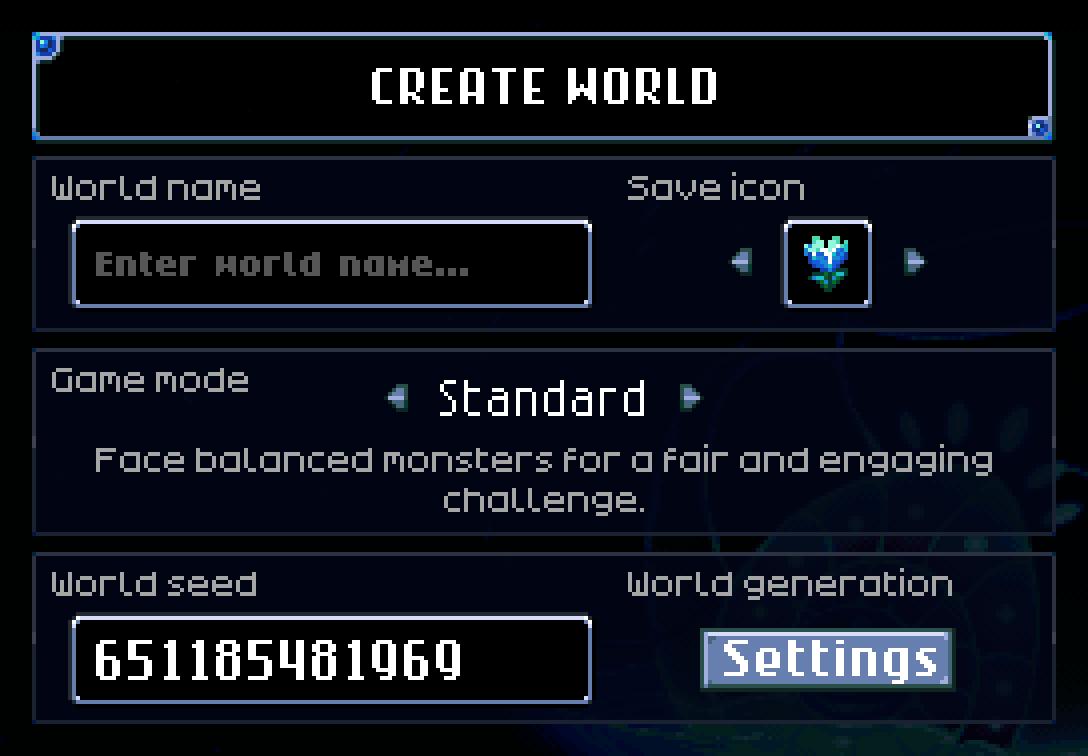
The world creation menu, with Standard as the selected game mode.
Game mode is a world mechanic in Core Keeper, and is chosen during world creation. Once set for a world, it cannot be changed.
Currently, there are 4 different game modes - Creative, Casual, Standard, and Hard.
Standard
"Face balanced monsters for a fair and engaging challenge."
Standard mode is the default game mode. As it is the default Core Keeper experience, no changes are made to gameplay.
Casual
"Encounter gentler monsters in a relaxed, enjoyable setting."
Casual mode is one of the available game modes. It reduces the health and damage of all enemies, making it a good mode for newer players or those less focused on combat.
Changes
- Enemy health and damage is reduced by 50%.
Hard
"Tackle tougher monsters and reap greater rewards."
Hard mode is another one of the available game modes. It significantly increases the health and damage of all enemies. In turn, Hard mode also increases the amount of loot dropped by bosses, making it a good mode for larger playthroughs.
Changes
- Enemy and boss health is increased by 50%, and damage is increased by 100%.
- The amount of times boss loot is rolled is increased by 50%.[1]
Creative
"Set your imagination free in an empty, limitless world."
Creative mode is a unique game mode - it grants players access unlimited access to most items in Core Keeper, enabling them to build whatever they wish. It also overrides world generation, instead removing the Core and leaving a large patch of Dirt Block ground at the center of the world.
Worlds set to Creative mode can only be accessed by characters specifically created for it.
Creative mode includes several tools for the player to use, accessible from their inventory. These include:
Creative UI
The creative UI allows the player to obtain almost every object in the game in item form. This includes creatures, and objects that are normally unobtainable, such as Obsidian Blocks.
God Mode
When enabled, the player gains a number of unique abilities.
- The player becomes immune to all damage.
- The player gains the ability to travel through walls and over pits without obstruction.
- All objects and enemies can be destroyed in a single hit and do not drop items.
- Objects are placed much faster than normal, and are not consumed on use.
Pause World
This option essentially disables a world's logic; it stops all creatures from moving and performing any actions, and stops liquids from spreading.
This option can only be toggled by admins.
Notes
- Achievements cannot be earned while playing in a Creative mode world.
History
- 1.0.1.0: The creative UI is now enabled by default in Creative mode.
- 1.0.0.10: The arrows shown next to categories in the creative UI now scrolls the list.
- 0.7.4.2-7883: Fixed a Creative mode issue where the Pale and Dark Blue Kelp appeared in the valuable category instead of consumable.
- 0.7.4.0-6fbe: Fixed a bug where The Core would appear on the map while in Creative mode.
- 0.6.0.0-62a8:
- Introduced Casual mode and Creative mode.
- Enemy health increase in Hard mode reduced from +100% to +50%.
- 0.4.2-d097: Added missing Hard mode setting for dedicated servers.
- 0.3.0-297a: Introduced Hard mode.
- 0.1.91e2cab: Introduced with Standard mode.
References
- ↑ This is implemented by multiplying after the base amount of rolls has been chosen, and then rounding. For example, Glurch the Abominous Mass has 4–6 loot rolls. The game randomly picks 5, multiplies by ×1.5 (= 7.5), and rounds to 8 loot rolls total.
| Mechanics | ||||||||||||
|---|---|---|---|---|---|---|---|---|---|---|---|---|
|


